
Download SurfEasy VPN – Secure, Fast, Free VPN for Windows, Mac, Android & iOS
SurfEasy VPN is a powerful, user-friendly tool designed to enhance your online privacy and security across all major platforms. Whether you're browsing on Windows, Mac, Android, or iOS, SurfEasy delivers a seamless experience with military-grade encryption and a no-logs policy. This free VPN software allows you to unblock restricted content, protect your data on public Wi-Fi, and browse the web anonymously.
With its intuitive interface and automatic connection features, SurfEasy is ideal for both beginners and advanced users. The app is regularly updated to ensure compatibility with the latest operating systems and to strengthen security protocols. Available for Windows 8 and above, as well as mobile devices, SurfEasy makes online protection simple, fast, and accessible to everyone.
Why SurfEasy VPN Stands Out in the World of Free Security Tools
When it comes to choosing a reliable and secure VPN, the market is flooded with options—many of which promise privacy but fall short in performance or transparency. SurfEasy VPN, however, manages to stand out as a trustworthy, free solution that doesn’t compromise on security or speed. Unlike many free VPNs that throttle bandwidth, inject ads, or log user data, SurfEasy maintains a strict no-logs policy, ensuring your browsing history remains private. This commitment to user privacy is backed by AES-256 encryption, the same standard used by governments and financial institutions worldwide.
One of the most appealing aspects of SurfEasy is its ease of use. The app features a minimalist design with just a single button to connect, making it perfect for users who aren’t tech-savvy. Despite its simplicity, the underlying technology is robust. SurfEasy uses advanced routing protocols to ensure minimal latency, meaning you won’t experience the frustrating slowdowns often associated with free VPNs. Whether you're streaming content, checking emails, or shopping online, SurfEasy keeps your data protected without sacrificing speed.
Another standout feature is its ability to unblock geo-restricted content. Many users rely on SurfEasy to access region-locked streaming services like Netflix, BBC iPlayer, and Hulu from abroad. The app supports multiple server locations across the globe, giving you flexibility in where you appear to be online. Additionally, SurfEasy’s automatic connection feature ensures your privacy is always active whenever you join a public Wi-Fi network—ideal for travelers or remote workers. With regular updates and strong community support, SurfEasy continues to evolve, making it a top choice for anyone seeking a free, secure, and dependable VPN.
Features and Capabilities That Make SurfEasy a Must-Have Tool
SurfEasy VPN comes packed with a suite of features designed to enhance your online safety and freedom. The most critical feature is its 256-bit AES encryption, which secures your data from hackers, ISPs, and even government surveillance. This level of protection ensures that sensitive information like passwords, banking details, and personal messages remain confidential.
Another key capability is the no-logs policy. SurfEasy explicitly states that it does not store any user activity, connection logs, or IP addresses. This transparency is rare among free VPNs and gives users peace of mind knowing their online behavior isn’t being tracked or sold.
The app also includes a kill switch feature, which automatically disconnects your internet if the VPN connection drops. This prevents any accidental exposure of your real IP address, maintaining your anonymity even during brief interruptions.
SurfEasy supports multiple platforms, including Windows 8 and above, macOS, Android, and iOS. This cross-platform availability ensures that your privacy is protected no matter what device you're using. The mobile apps are particularly well-optimized, offering battery-efficient performance and easy one-tap connection.
For users who need flexibility, SurfEasy provides access to servers in multiple countries, allowing you to bypass censorship and access blocked websites. Whether you're a student trying to reach academic resources or a traveler wanting to watch home country content, SurfEasy delivers reliable performance. The interface is clean and intuitive, with real-time connection status and server selection tools. All these features combine to make SurfEasy a comprehensive security tool that goes beyond basic encryption.
- 256-bit AES encryption – Military-grade security for your data
- No-logs policy – Your privacy is never compromised
- Kill switch – Prevents data leaks during connection drops
- Multi-platform support – Works on Windows, Mac, Android, and iOS
- Geo-unblocking – Access region-locked content and websites
- Automatic connection – Protects you on public Wi-Fi without effort
- Simple, intuitive interface – Easy to use for beginners
How to Install and Use SurfEasy VPN on Your Devices
Installing SurfEasy VPN is a straightforward process that takes less than five minutes across all supported platforms. For Windows users, visit the official SurfEasy website or download the app from the Microsoft Store. Once downloaded, run the installer and follow the on-screen prompts. After installation, launch the app and sign in using your email address. The free version allows instant access—no credit card required.
On Mac, the process is similar. Download the .dmg file from the official site, open it, and drag the SurfEasy app into your Applications folder. Once installed, open the app and sign in. The first-time setup includes a quick tutorial that explains how to connect and manage your settings.
For Android users, head to the Google Play Store, search for "SurfEasy VPN," and install the app. After installation, open it and create an account. The app will automatically prompt you to connect to a server. You can choose from a list of global locations or let the app pick the fastest one automatically.
iOS users can download SurfEasy from the Apple App Store. The app is optimized for iPhones and iPads, offering a sleek interface and smooth performance. After installation, sign in and tap the "Connect" button to begin securing your connection.
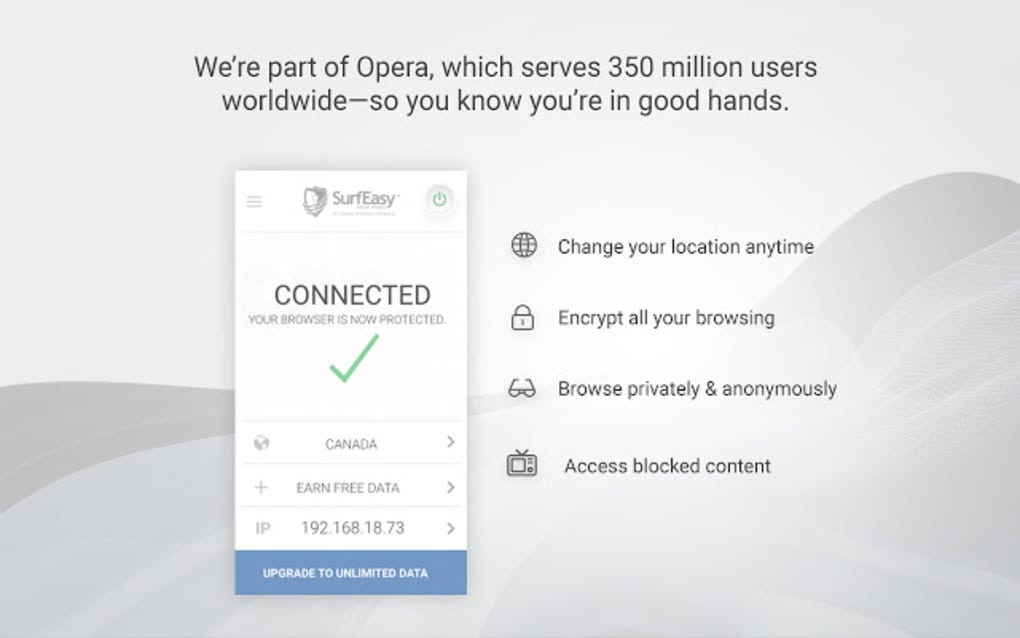
Once connected, you’ll see a green indicator in the app, confirming your data is encrypted. You can switch servers, disable the auto-connect feature, or enable the kill switch in the settings menu. SurfEasy also allows you to customize connection preferences, such as enabling split tunneling (if available in your region) to route only specific apps through the VPN.
Regular updates are essential for maintaining security. SurfEasy pushes automatic updates through the app stores, ensuring you always have the latest protection. If you ever encounter issues, the app includes a built-in support center with FAQs and troubleshooting guides.
Compatibility and System Requirements for Smooth Performance
SurfEasy VPN is designed to work seamlessly across a wide range of devices and operating systems. On desktops, it supports Windows 8 and above, including Windows 10 and Windows 11. The app is compatible with both 32-bit and 64-bit versions, ensuring broad accessibility. For Mac users, SurfEasy is compatible with macOS Mojave (10.14) and later, making it suitable for most modern Apple devices.
On mobile platforms, SurfEasy is available for Android 5.0 (Lollipop) and above, as well as iOS 11 and later. This ensures that even older smartphones and tablets can benefit from the app’s security features. The mobile apps are optimized for performance, with minimal battery drain and low memory usage—critical for long-term use.
One of the app’s strengths is its lightweight design. Unlike some heavy VPN clients that slow down your device, SurfEasy runs efficiently in the background without consuming excessive resources. This makes it ideal for users with mid-range or older devices who still want top-tier privacy protection.
SurfEasy also supports various network types, including Wi-Fi, mobile data, and Ethernet. Whether you're at home, in a coffee shop, or on the go, the app adapts quickly to changing network conditions. The automatic reconnection feature ensures your privacy remains intact even if you switch between networks.
For users concerned about compatibility with other software, SurfEasy is known to work well with popular browsers like Chrome, Firefox, and Safari. It also integrates smoothly with antivirus programs and firewall settings, without causing conflicts or errors.
- Windows – 8, 10, 11 (32/64-bit)
- macOS – Mojave (10.14) and later
- Android – 5.0 (Lollipop) and above
- iOS – 11 and later
- Language – English only (current version)
- Storage – ~50MB free space required
Pros and Cons: Is SurfEasy Right for You?
Every software has its strengths and limitations. Here’s a balanced look at what makes SurfEasy VPN a strong contender—and where it could improve.
Pros
- Free and secure – Offers robust protection without cost
- Strong encryption – 256-bit AES ensures top-tier security
- No-logs policy – Transparent about user privacy
- Simple interface – Easy to use for all skill levels
- Auto-connect on public Wi-Fi – Keeps you protected automatically
- Multi-platform support – Works across Windows, Mac, Android, iOS
- Fast speeds – Minimal lag, even on free tier
Cons
- Limited server locations – Fewer options compared to premium VPNs
- English-only interface – Not available in other languages
- No dedicated desktop client for all features – Some advanced options are mobile-only
- Free version has bandwidth limits – Not ideal for heavy streaming
- Occasional server congestion – Popular servers may slow down
Frequently Asked Questions (FAQ)
Is SurfEasy VPN really free?
Yes, SurfEasy offers a fully free version with no hidden charges. You can use it indefinitely without a credit card or subscription. However, the free tier includes bandwidth limits and fewer server options compared to premium plans.
Does SurfEasy log user data?
No, SurfEasy maintains a strict no-logs policy. It does not record your IP address, browsing history, connection timestamps, or online activities. This ensures your privacy is protected at all times.
Can I use SurfEasy on multiple devices?
Yes, you can install SurfEasy on up to five devices simultaneously, including Windows, Mac, Android, and iOS. Each device can be connected independently, allowing you to protect all your devices with one account.
How fast is SurfEasy VPN?
SurfEasy delivers fast speeds, especially on the free plan. While performance may vary based on server load and your location, most users report minimal lag when browsing, streaming, or downloading.
Is SurfEasy safe to download?
Yes, SurfEasy is safe to download from official sources like its website or trusted app stores (Google Play, Apple App Store). It is regularly updated and scanned for malware. Always avoid third-party download sites to prevent fake versions.
Final Verdict: A Reliable Free VPN for Everyday Users
After thorough evaluation, SurfEasy VPN emerges as one of the best free security tools available today. It strikes an excellent balance between performance, privacy, and ease of use. While it may not offer the same number of features as paid alternatives, its core strengths—strong encryption, no-logs policy, and automatic protection—make it ideal for everyday browsing, public Wi-Fi use, and light streaming.
If you're looking for a secure, fast, and reliable way to protect your online identity without spending a dime, SurfEasy is a top choice. Whether you're a student, traveler, or remote worker, this app provides the essential tools to stay safe online.
Download SurfEasy VPN today and take control of your digital privacy—free, secure, and hassle-free.







